


SWIT OMNI-99S
SWIT OMNI-99S 99Wh USB-C Info Pocket V-Mount Battery | 65W USB-C PD | D-Tap I/O | Fly-Friendly Original price was: 725 AED.Current price is: 680 AED. Tax included
Back to products
Roccat - Kova Pure Performance Ambidextrous Gaming Mouse (White)
Roccat - Kova Pure Performance Ambidextrous Gaming Mouse (White) Original price was: 269 AED.Current price is: 119 AED. Tax included

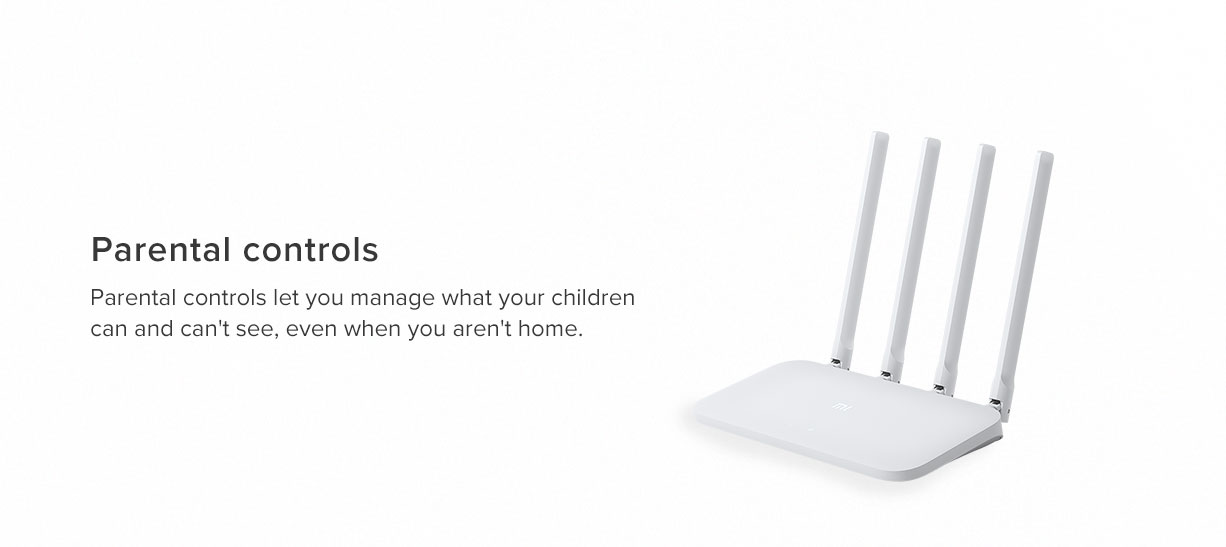
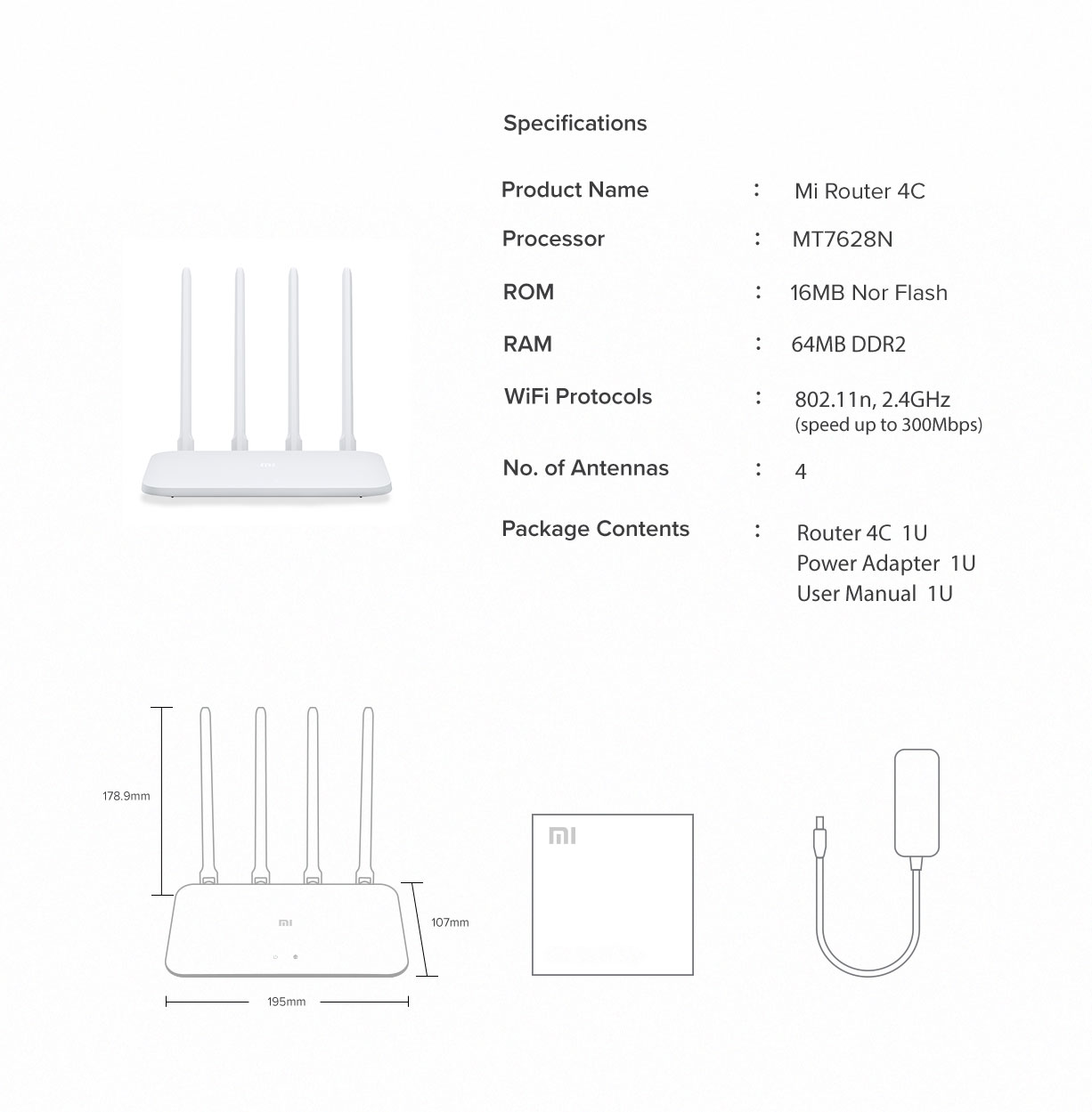
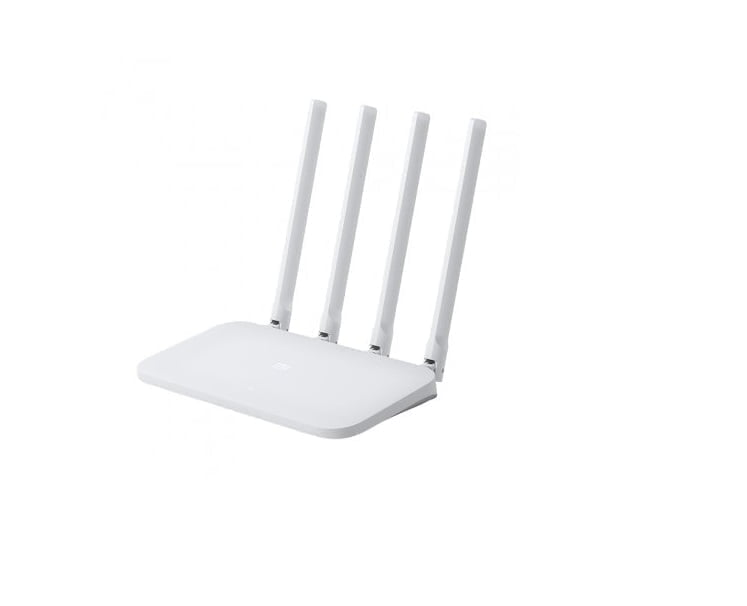
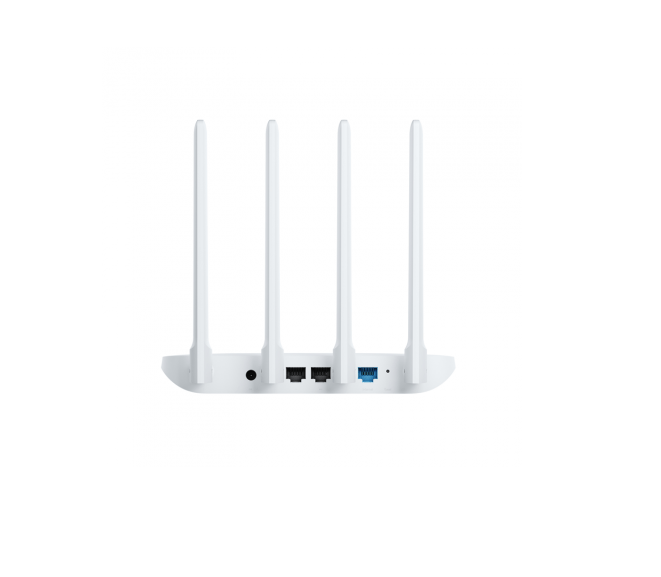
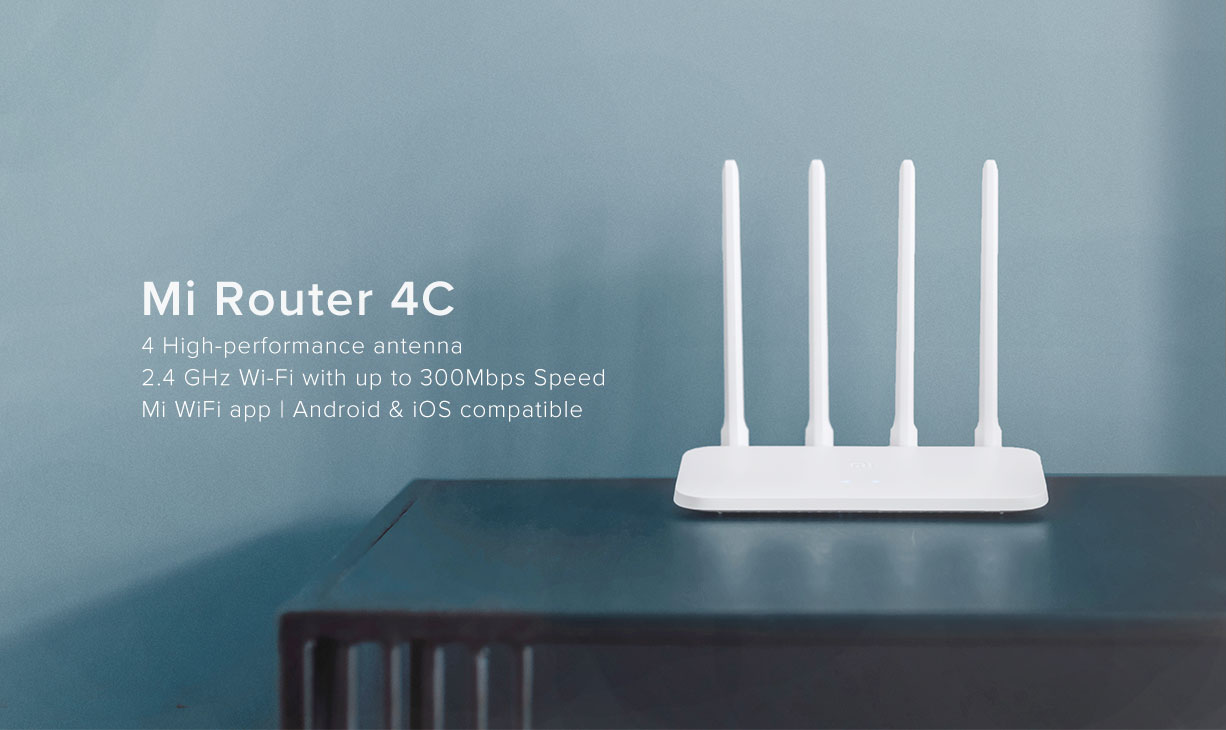
Xiaomi Mi Router 4C Global Version (300Mbps) 4 Antennas Wireless Routers Repeater for Home

45 AED Tax included

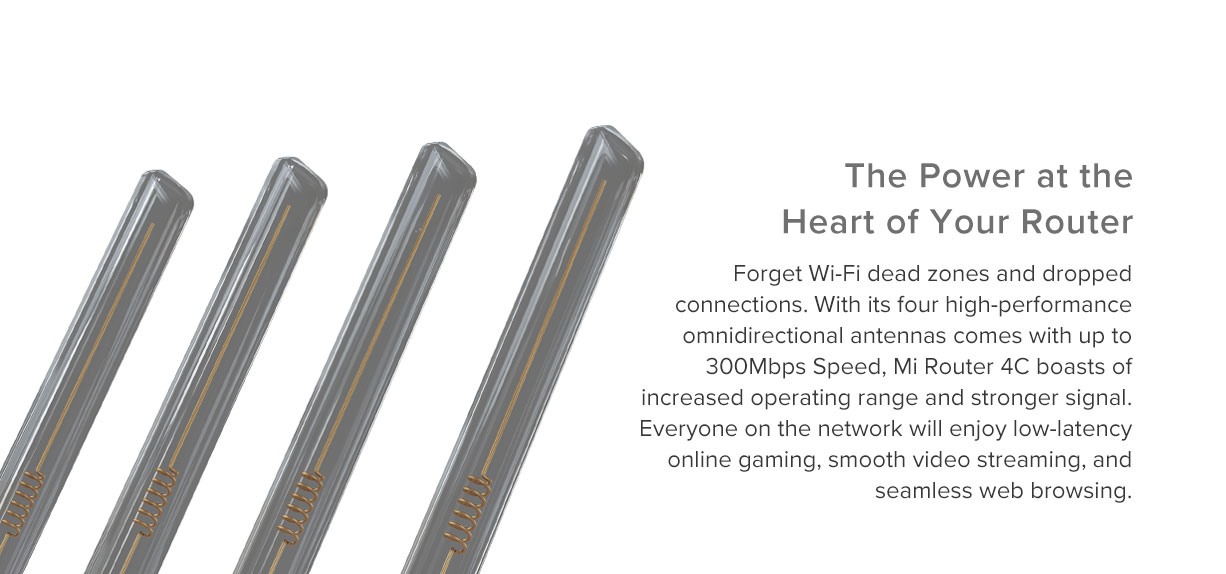
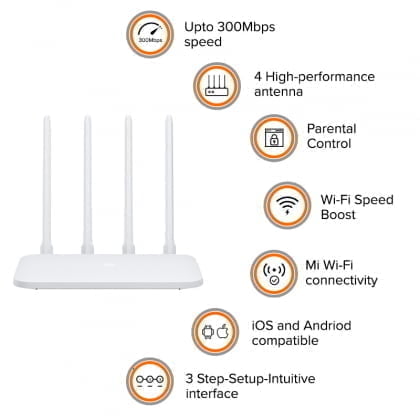
  • Four High-gain Antenna Four external omnidirectional antennas with up to 5dBi gain strengthen signal gain efficiency. Hugely improve transmission performance. It does an outstanding job in many complex environments.
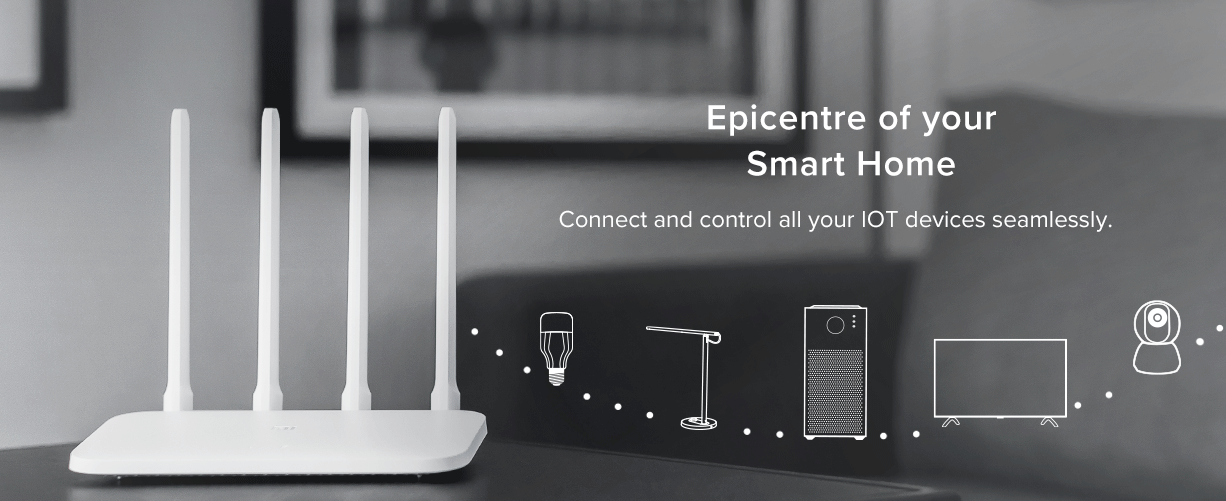
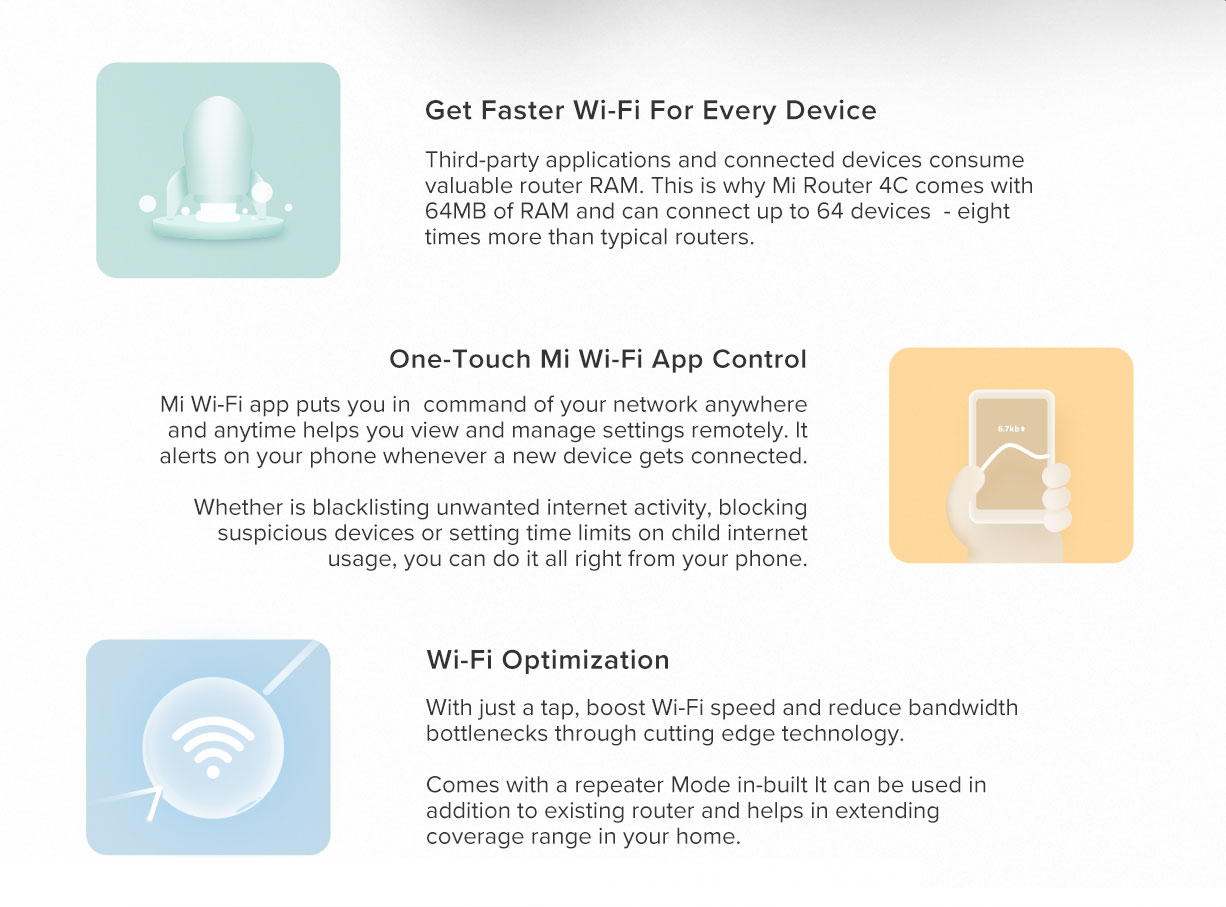
  • 64MB Large Memory Featuring 64MB memory, the data transmission is much more stable. It ensures fluent operation and provides stability for the connection of more smart devices. The maximum connecting devices are 64. It would be an unnecessary home device for you.
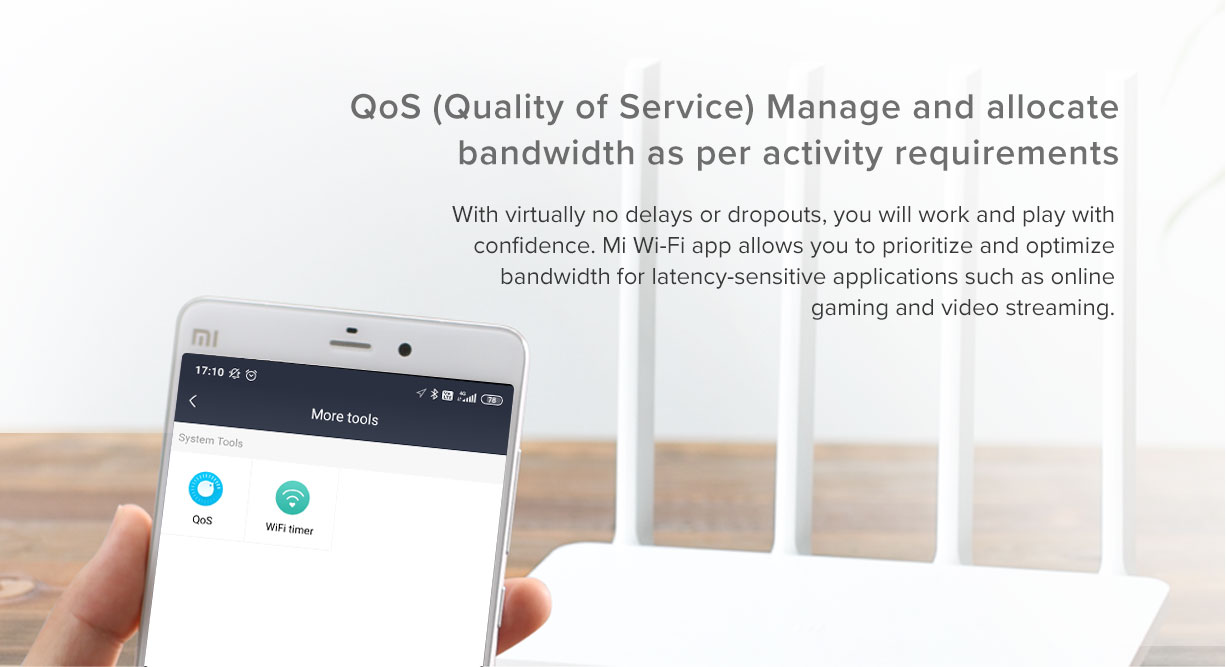
  • Faster Internet Surfing Play game, watch video or view pages, you can select the configuration of the router according to your application scenes. You can also let Xiaomi router 4C optimize smartly for you. A priority of single configuration of internet bandwidth is accessible to have a better experience.
  • Smart Prevention of WiFi Squatter Simple or Internet sharing software leads to WiFi squatter. However, Xiaomi router 4C can alarm you when there is a new network connection. If encountered high-risk connection, You can blacklist it or prevent it by safety level.
  • One Key Acceleration Turn on Xiaomi WiFi APP, find the tool kit and slightly click “WiFi Optimization” to make multi-dimensional auto-check and optimize the WiFi communication channel. Remote Control Use Xiao WiFi APP to manage network freely. Check the network status even you are away from home.
35 Items sold in last 20 days

Out of stock

19 People watching this product now!
SKU: 6970244525529 Category: Brand:
Description

Xiaomi Mi Router 4C Global Version (300Mbps) 4 Antennas Wireless Routers Repeater for Home
5561D3Eaa2A9Cafd72Cbb01C76Eaeed1 Xiaomi ≪Ul≫ ≪Li≫≪Span Class=&Quot;A-List-Item&Quot;≫ Four High-Gain Antenna Four External Omnidirectional Antennas With Up To 5Dbi Gain Strengthen Signal Gain Efficiency. Hugely Improve Transmission Performance. It Does An Outstanding Job In Many Complex Environments. ≪/Span≫≪/Li≫ ≪Li≫≪Span Class=&Quot;A-List-Item&Quot;≫ 64Mb Large Memory Featuring 64Mb Memory, The Data Transmission Is Much More Stable. It Ensures Fluent Operation And Provides Stability For The Connection Of More Smart Devices. The Maximum Connecting Devices Are 64. It Would Be An Unnecessary Home Device For You. ≪/Span≫≪/Li≫ ≪Li≫≪Span Class=&Quot;A-List-Item&Quot;≫ Faster Internet Surfing Play Game, Watch Video Or View Pages, You Can Select The Configuration Of The Router According To Your Application Scenes. You Can Also Let Xiaomi Router 4C Optimize Smartly For You. A Priority Of Single Configuration Of Internet Bandwidth Is Accessible To Have A Better Experience. ≪/Span≫≪/Li≫ ≪Li≫≪Span Class=&Quot;A-List-Item&Quot;≫ Smart Prevention Of Wifi Squatter Simple Or Internet Sharing Software Leads To Wifi Squatter. However, Xiaomi Router 4C Can Alarm You When There Is A New Network Connection. If Encountered High-Risk Connection, You Can Blacklist It Or Prevent It By Safety Level. ≪/Span≫≪/Li≫ ≪Li≫≪Span Class=&Quot;A-List-Item&Quot;≫ One Key Acceleration Turn On Xiaomi Wifi App, Find The Tool Kit And Slightly Click &Quot;Wifi Optimization&Quot; To Make Multi-Dimensional Auto-Check And Optimize The Wifi Communication Channel. Remote Control Use Xiao Wifi App To Manage Network Freely. Check The Network Status Even You Are Away From Home. ≪/Span≫≪/Li≫ ≪/Ul≫ Xiaomi Xiaomi Mi Router 4C Global Version (300Mbps) 4 Antennas Wireless Routers Repeater For Home

478F6C0904Dccfcb9E37Bb60B565F0B0 Xiaomi ≪Ul≫ ≪Li≫≪Span Class=&Quot;A-List-Item&Quot;≫ Four High-Gain Antenna Four External Omnidirectional Antennas With Up To 5Dbi Gain Strengthen Signal Gain Efficiency. Hugely Improve Transmission Performance. It Does An Outstanding Job In Many Complex Environments. ≪/Span≫≪/Li≫ ≪Li≫≪Span Class=&Quot;A-List-Item&Quot;≫ 64Mb Large Memory Featuring 64Mb Memory, The Data Transmission Is Much More Stable. It Ensures Fluent Operation And Provides Stability For The Connection Of More Smart Devices. The Maximum Connecting Devices Are 64. It Would Be An Unnecessary Home Device For You. ≪/Span≫≪/Li≫ ≪Li≫≪Span Class=&Quot;A-List-Item&Quot;≫ Faster Internet Surfing Play Game, Watch Video Or View Pages, You Can Select The Configuration Of The Router According To Your Application Scenes. You Can Also Let Xiaomi Router 4C Optimize Smartly For You. A Priority Of Single Configuration Of Internet Bandwidth Is Accessible To Have A Better Experience. ≪/Span≫≪/Li≫ ≪Li≫≪Span Class=&Quot;A-List-Item&Quot;≫ Smart Prevention Of Wifi Squatter Simple Or Internet Sharing Software Leads To Wifi Squatter. However, Xiaomi Router 4C Can Alarm You When There Is A New Network Connection. If Encountered High-Risk Connection, You Can Blacklist It Or Prevent It By Safety Level. ≪/Span≫≪/Li≫ ≪Li≫≪Span Class=&Quot;A-List-Item&Quot;≫ One Key Acceleration Turn On Xiaomi Wifi App, Find The Tool Kit And Slightly Click &Quot;Wifi Optimization&Quot; To Make Multi-Dimensional Auto-Check And Optimize The Wifi Communication Channel. Remote Control Use Xiao Wifi App To Manage Network Freely. Check The Network Status Even You Are Away From Home. ≪/Span≫≪/Li≫ ≪/Ul≫ Xiaomi Xiaomi Mi Router 4C Global Version (300Mbps) 4 Antennas Wireless Routers Repeater For Home

Bd52E0C663Bf23D5Eeb7F94572Bf791E Xiaomi ≪Ul≫ ≪Li≫≪Span Class=&Quot;A-List-Item&Quot;≫ Four High-Gain Antenna Four External Omnidirectional Antennas With Up To 5Dbi Gain Strengthen Signal Gain Efficiency. Hugely Improve Transmission Performance. It Does An Outstanding Job In Many Complex Environments. ≪/Span≫≪/Li≫ ≪Li≫≪Span Class=&Quot;A-List-Item&Quot;≫ 64Mb Large Memory Featuring 64Mb Memory, The Data Transmission Is Much More Stable. It Ensures Fluent Operation And Provides Stability For The Connection Of More Smart Devices. The Maximum Connecting Devices Are 64. It Would Be An Unnecessary Home Device For You. ≪/Span≫≪/Li≫ ≪Li≫≪Span Class=&Quot;A-List-Item&Quot;≫ Faster Internet Surfing Play Game, Watch Video Or View Pages, You Can Select The Configuration Of The Router According To Your Application Scenes. You Can Also Let Xiaomi Router 4C Optimize Smartly For You. A Priority Of Single Configuration Of Internet Bandwidth Is Accessible To Have A Better Experience. ≪/Span≫≪/Li≫ ≪Li≫≪Span Class=&Quot;A-List-Item&Quot;≫ Smart Prevention Of Wifi Squatter Simple Or Internet Sharing Software Leads To Wifi Squatter. However, Xiaomi Router 4C Can Alarm You When There Is A New Network Connection. If Encountered High-Risk Connection, You Can Blacklist It Or Prevent It By Safety Level. ≪/Span≫≪/Li≫ ≪Li≫≪Span Class=&Quot;A-List-Item&Quot;≫ One Key Acceleration Turn On Xiaomi Wifi App, Find The Tool Kit And Slightly Click &Quot;Wifi Optimization&Quot; To Make Multi-Dimensional Auto-Check And Optimize The Wifi Communication Channel. Remote Control Use Xiao Wifi App To Manage Network Freely. Check The Network Status Even You Are Away From Home. ≪/Span≫≪/Li≫ ≪/Ul≫ Xiaomi Xiaomi Mi Router 4C Global Version (300Mbps) 4 Antennas Wireless Routers Repeater For Home

82Bd44A0D502Ab4212891A5C9Be55624 Xiaomi ≪Ul≫ ≪Li≫≪Span Class=&Quot;A-List-Item&Quot;≫ Four High-Gain Antenna Four External Omnidirectional Antennas With Up To 5Dbi Gain Strengthen Signal Gain Efficiency. Hugely Improve Transmission Performance. It Does An Outstanding Job In Many Complex Environments. ≪/Span≫≪/Li≫ ≪Li≫≪Span Class=&Quot;A-List-Item&Quot;≫ 64Mb Large Memory Featuring 64Mb Memory, The Data Transmission Is Much More Stable. It Ensures Fluent Operation And Provides Stability For The Connection Of More Smart Devices. The Maximum Connecting Devices Are 64. It Would Be An Unnecessary Home Device For You. ≪/Span≫≪/Li≫ ≪Li≫≪Span Class=&Quot;A-List-Item&Quot;≫ Faster Internet Surfing Play Game, Watch Video Or View Pages, You Can Select The Configuration Of The Router According To Your Application Scenes. You Can Also Let Xiaomi Router 4C Optimize Smartly For You. A Priority Of Single Configuration Of Internet Bandwidth Is Accessible To Have A Better Experience. ≪/Span≫≪/Li≫ ≪Li≫≪Span Class=&Quot;A-List-Item&Quot;≫ Smart Prevention Of Wifi Squatter Simple Or Internet Sharing Software Leads To Wifi Squatter. However, Xiaomi Router 4C Can Alarm You When There Is A New Network Connection. If Encountered High-Risk Connection, You Can Blacklist It Or Prevent It By Safety Level. ≪/Span≫≪/Li≫ ≪Li≫≪Span Class=&Quot;A-List-Item&Quot;≫ One Key Acceleration Turn On Xiaomi Wifi App, Find The Tool Kit And Slightly Click &Quot;Wifi Optimization&Quot; To Make Multi-Dimensional Auto-Check And Optimize The Wifi Communication Channel. Remote Control Use Xiao Wifi App To Manage Network Freely. Check The Network Status Even You Are Away From Home. ≪/Span≫≪/Li≫ ≪/Ul≫ Xiaomi Xiaomi Mi Router 4C Global Version (300Mbps) 4 Antennas Wireless Routers Repeater For Home

58Bf0Fb198Caf852Ce2D7F438B3B1Fc4 Xiaomi ≪Ul≫ ≪Li≫≪Span Class=&Quot;A-List-Item&Quot;≫ Four High-Gain Antenna Four External Omnidirectional Antennas With Up To 5Dbi Gain Strengthen Signal Gain Efficiency. Hugely Improve Transmission Performance. It Does An Outstanding Job In Many Complex Environments. ≪/Span≫≪/Li≫ ≪Li≫≪Span Class=&Quot;A-List-Item&Quot;≫ 64Mb Large Memory Featuring 64Mb Memory, The Data Transmission Is Much More Stable. It Ensures Fluent Operation And Provides Stability For The Connection Of More Smart Devices. The Maximum Connecting Devices Are 64. It Would Be An Unnecessary Home Device For You. ≪/Span≫≪/Li≫ ≪Li≫≪Span Class=&Quot;A-List-Item&Quot;≫ Faster Internet Surfing Play Game, Watch Video Or View Pages, You Can Select The Configuration Of The Router According To Your Application Scenes. You Can Also Let Xiaomi Router 4C Optimize Smartly For You. A Priority Of Single Configuration Of Internet Bandwidth Is Accessible To Have A Better Experience. ≪/Span≫≪/Li≫ ≪Li≫≪Span Class=&Quot;A-List-Item&Quot;≫ Smart Prevention Of Wifi Squatter Simple Or Internet Sharing Software Leads To Wifi Squatter. However, Xiaomi Router 4C Can Alarm You When There Is A New Network Connection. If Encountered High-Risk Connection, You Can Blacklist It Or Prevent It By Safety Level. ≪/Span≫≪/Li≫ ≪Li≫≪Span Class=&Quot;A-List-Item&Quot;≫ One Key Acceleration Turn On Xiaomi Wifi App, Find The Tool Kit And Slightly Click &Quot;Wifi Optimization&Quot; To Make Multi-Dimensional Auto-Check And Optimize The Wifi Communication Channel. Remote Control Use Xiao Wifi App To Manage Network Freely. Check The Network Status Even You Are Away From Home. ≪/Span≫≪/Li≫ ≪/Ul≫ Xiaomi Xiaomi Mi Router 4C Global Version (300Mbps) 4 Antennas Wireless Routers Repeater For Home

48Dfaeebea5Cb0F92035B5Ee4D14D573 Xiaomi ≪Ul≫ ≪Li≫≪Span Class=&Quot;A-List-Item&Quot;≫ Four High-Gain Antenna Four External Omnidirectional Antennas With Up To 5Dbi Gain Strengthen Signal Gain Efficiency. Hugely Improve Transmission Performance. It Does An Outstanding Job In Many Complex Environments. ≪/Span≫≪/Li≫ ≪Li≫≪Span Class=&Quot;A-List-Item&Quot;≫ 64Mb Large Memory Featuring 64Mb Memory, The Data Transmission Is Much More Stable. It Ensures Fluent Operation And Provides Stability For The Connection Of More Smart Devices. The Maximum Connecting Devices Are 64. It Would Be An Unnecessary Home Device For You. ≪/Span≫≪/Li≫ ≪Li≫≪Span Class=&Quot;A-List-Item&Quot;≫ Faster Internet Surfing Play Game, Watch Video Or View Pages, You Can Select The Configuration Of The Router According To Your Application Scenes. You Can Also Let Xiaomi Router 4C Optimize Smartly For You. A Priority Of Single Configuration Of Internet Bandwidth Is Accessible To Have A Better Experience. ≪/Span≫≪/Li≫ ≪Li≫≪Span Class=&Quot;A-List-Item&Quot;≫ Smart Prevention Of Wifi Squatter Simple Or Internet Sharing Software Leads To Wifi Squatter. However, Xiaomi Router 4C Can Alarm You When There Is A New Network Connection. If Encountered High-Risk Connection, You Can Blacklist It Or Prevent It By Safety Level. ≪/Span≫≪/Li≫ ≪Li≫≪Span Class=&Quot;A-List-Item&Quot;≫ One Key Acceleration Turn On Xiaomi Wifi App, Find The Tool Kit And Slightly Click &Quot;Wifi Optimization&Quot; To Make Multi-Dimensional Auto-Check And Optimize The Wifi Communication Channel. Remote Control Use Xiao Wifi App To Manage Network Freely. Check The Network Status Even You Are Away From Home. ≪/Span≫≪/Li≫ ≪/Ul≫ Xiaomi Xiaomi Mi Router 4C Global Version (300Mbps) 4 Antennas Wireless Routers Repeater For Home

C9Dd53E4A2B9E3Da3Ed44384D6B7Ec07 Xiaomi ≪Ul≫ ≪Li≫≪Span Class=&Quot;A-List-Item&Quot;≫ Four High-Gain Antenna Four External Omnidirectional Antennas With Up To 5Dbi Gain Strengthen Signal Gain Efficiency. Hugely Improve Transmission Performance. It Does An Outstanding Job In Many Complex Environments. ≪/Span≫≪/Li≫ ≪Li≫≪Span Class=&Quot;A-List-Item&Quot;≫ 64Mb Large Memory Featuring 64Mb Memory, The Data Transmission Is Much More Stable. It Ensures Fluent Operation And Provides Stability For The Connection Of More Smart Devices. The Maximum Connecting Devices Are 64. It Would Be An Unnecessary Home Device For You. ≪/Span≫≪/Li≫ ≪Li≫≪Span Class=&Quot;A-List-Item&Quot;≫ Faster Internet Surfing Play Game, Watch Video Or View Pages, You Can Select The Configuration Of The Router According To Your Application Scenes. You Can Also Let Xiaomi Router 4C Optimize Smartly For You. A Priority Of Single Configuration Of Internet Bandwidth Is Accessible To Have A Better Experience. ≪/Span≫≪/Li≫ ≪Li≫≪Span Class=&Quot;A-List-Item&Quot;≫ Smart Prevention Of Wifi Squatter Simple Or Internet Sharing Software Leads To Wifi Squatter. However, Xiaomi Router 4C Can Alarm You When There Is A New Network Connection. If Encountered High-Risk Connection, You Can Blacklist It Or Prevent It By Safety Level. ≪/Span≫≪/Li≫ ≪Li≫≪Span Class=&Quot;A-List-Item&Quot;≫ One Key Acceleration Turn On Xiaomi Wifi App, Find The Tool Kit And Slightly Click &Quot;Wifi Optimization&Quot; To Make Multi-Dimensional Auto-Check And Optimize The Wifi Communication Channel. Remote Control Use Xiao Wifi App To Manage Network Freely. Check The Network Status Even You Are Away From Home. ≪/Span≫≪/Li≫ ≪/Ul≫ Xiaomi Xiaomi Mi Router 4C Global Version (300Mbps) 4 Antennas Wireless Routers Repeater For Home

D825F781Fc91366F0Bec8F35B485D9D8 Xiaomi ≪Ul≫ ≪Li≫≪Span Class=&Quot;A-List-Item&Quot;≫ Four High-Gain Antenna Four External Omnidirectional Antennas With Up To 5Dbi Gain Strengthen Signal Gain Efficiency. Hugely Improve Transmission Performance. It Does An Outstanding Job In Many Complex Environments. ≪/Span≫≪/Li≫ ≪Li≫≪Span Class=&Quot;A-List-Item&Quot;≫ 64Mb Large Memory Featuring 64Mb Memory, The Data Transmission Is Much More Stable. It Ensures Fluent Operation And Provides Stability For The Connection Of More Smart Devices. The Maximum Connecting Devices Are 64. It Would Be An Unnecessary Home Device For You. ≪/Span≫≪/Li≫ ≪Li≫≪Span Class=&Quot;A-List-Item&Quot;≫ Faster Internet Surfing Play Game, Watch Video Or View Pages, You Can Select The Configuration Of The Router According To Your Application Scenes. You Can Also Let Xiaomi Router 4C Optimize Smartly For You. A Priority Of Single Configuration Of Internet Bandwidth Is Accessible To Have A Better Experience. ≪/Span≫≪/Li≫ ≪Li≫≪Span Class=&Quot;A-List-Item&Quot;≫ Smart Prevention Of Wifi Squatter Simple Or Internet Sharing Software Leads To Wifi Squatter. However, Xiaomi Router 4C Can Alarm You When There Is A New Network Connection. If Encountered High-Risk Connection, You Can Blacklist It Or Prevent It By Safety Level. ≪/Span≫≪/Li≫ ≪Li≫≪Span Class=&Quot;A-List-Item&Quot;≫ One Key Acceleration Turn On Xiaomi Wifi App, Find The Tool Kit And Slightly Click &Quot;Wifi Optimization&Quot; To Make Multi-Dimensional Auto-Check And Optimize The Wifi Communication Channel. Remote Control Use Xiao Wifi App To Manage Network Freely. Check The Network Status Even You Are Away From Home. ≪/Span≫≪/Li≫ ≪/Ul≫ Xiaomi Xiaomi Mi Router 4C Global Version (300Mbps) 4 Antennas Wireless Routers Repeater For Home


This post is also available in: العربية (Arabic)

Additional information
BrandXiaomi
Reviews (0)

Reviews

There are no reviews yet.

Show only reviews in English (0)

Be the first to review “Xiaomi Mi Router 4C Global Version (300Mbps) 4 Antennas Wireless Routers Repeater for Home”